Hey everyone, let’s cut to the chase: when I chat with fellow small business owners, home crafters, and even my neighbor who’s always printing his kid’s soccer team flyers, one question comes up nonstop lately: “Is a mini desktop single pass printer actually worth it for home use?” As someone who’s been in the mini desktop single pass printer game for years (I won’t bore you with the corporate title – just call me the guy who tests every model before it leaves my warehouse), I’ve heard all the hot takes: “Single pass is too big for a desk!” “Home printers don’t need that speed!” Or even “It’s gonna break in a month!” Let’s break this down like I’m talking to you over a coffee, not at a trade show podium. Mini Desktop Single Pass Printer

First, let’s get real about what a mini desktop single pass printer actually is – because half the confusion comes from people mixing it up with the big industrial single pass units you see at warehouses. The industrial ones are huge, meant to print thousands of posters or product labels an hour. The mini desktop version? It’s compact, fits on a standard home desk, takes up barely more space than your average all-in-one, and uses the same single pass tech: instead of moving the print head left and right over paper like old inkjets or laser printers, the print head spans the whole width of the paper in one line, and the paper rolls under it in one pass. That’s the key difference – and it’s where all the pros and cons for home use live.
Let’s start with the stuff that makes it actually good for home life, because that’s what most of you care about. First up: speed. I know, I know – home printing rarely hits the thousands-of-pages mark. But think about the annoying stuff you print constantly: 10-page homework packets for your teen, a stack of 20 birthday invites for your niece, or even a whole photo album’s worth of family pics you need printed before the weekend. A regular desktop printer will trudge through that, spitting out one page every 3-5 seconds, waiting for the print head to move back and forth. The single pass mini? It cranks those same pages out in like half the time. Last month, I helped a mom print 25 field trip permission slips for her kid’s class – a regular printer took 2 minutes, my mini single pass took 40 seconds. No exaggeration, I timed it. That’s a game-changer when you’re running late for school or a party.
Next, print quality – and let’s be honest, this is make-or-break for home use, especially if you’re printing photos, art, or things that need to look nice. Because the single pass head lays down every pixel in one go, there’s no “banding” – that annoying horizontal line you sometimes see in photos or gradients from print heads moving back and forth. I’ve had customers tell me they switched from their old inkjet after their kid’s graduation photo had a faint gray band right across their daughter’s face. With single pass mini? That’s not a problem. The tech is designed to lay down ink (or toner, depending on the model) evenly, so colors are more vibrant, text is sharper, and even fine details like doodles or tiny text on craft labels look way cleaner. I do print my own stuff to test every week – last week I printed a custom sticker sheet for my best friend’s small candle business, and the lines on the flame icons were so sharp I could read the tiny “soy wax” text I added, which my old printer would have smudged.
Wait, and let’s talk about cost, because everyone hates surprise printer bills. A lot of people assume single pass equals expensive, but the mini desktop models for home use? They’re not that pricier than a good all-in-one – like, $100-$200 more at most, and that’s a one-time cost. The ink or toner savings is where it gets good, too. Because the single pass head is more efficient, it uses less ink per page than regular printers. I had a customer who used to go through $50 ink cartridges every month for her 10 pages a week of homework – with the mini single pass, she only spends $15 a month total. That adds up over a year, right?
Now, I’m not gonna lie – there are downsides, and I’d be a bad supplier if I didn’t tell you the real issues, not just the sales pitch. First, space. A mini desktop single pass is smaller than the industrial version, but it’s still a bit bulkier than a tiny portable printer. If your desk is already cluttered with a laptop, a monitor, and that pile of random junk (we all have that), you might have to move something around. But most models are 15-20 inches wide – that’s the same as a standard 8.5×11 printer, so if you have a little extra desk space, it fits fine. I test every model in my tiny home office, so trust me, I know: my desk is 3 feet wide, and my mini single pass fits next to my laptop with room for a coffee mug. No space crisis here.
Another downside? Paper handling. Because it uses that rolling paper feed, it works best with standard 8.5×11 paper, cardstock, or photo paper – you can’t really do weird stuff like envelopes or weirdly shaped craft materials, right? Wait, actually, some newer mini models do handle envelopes, but if you’re printing custom die-cut shapes or super thick fabric, it might not work. If your main printing is standard home stuff – docs, photos, invites – that’s not a big deal. But if you’re someone who prints random random stuff, like custom fabric patches for your backpack, maybe a single pass isn’t for you.
Oh, and initial setup. I’m not gonna say it’s hard, but it’s different from plug-and-play inkjets. The print head is factory-calibrated, so you just plug it in, download the app, and you’re good – but some people get confused when they first load paper, because it’s a roll feed instead of a tray. Once you get the hang of it, it’s easier, but it’s not the “open box and print” experience some people want. I always send a quick setup video with every unit I sell, so no one gets stuck – that’s the service side of this job that matters most, not just selling a machine.
Now, who is this printer actually for, and who should skip it? Let’s make it specific, because “home use” covers everything from a college dorm to a family of four to a small side hustle. If you’re a student printing 50-page research papers, a side hustler selling custom stickers or art prints, a parent printing birthday invites or kid’s homework, or someone who loves printing high-quality family photos at home? This is perfect for you. The speed, quality, and long-term cost make it way better than a basic inkjet that dies in a year. If you’re someone who only prints 2 pages a month, has a tiny desk with zero extra space, or needs to print super unique, weird materials? You can stick with your old printer – no hard feelings.
Wait, let’s talk about a real customer example, because I hate when suppliers make stuff up. Last month, a guy named Jake reached out to me – he’s a freelance graphic designer working from his apartment, printing client drafts and small personal projects. He had an old laser printer that took 10 minutes to print a 10-page draft, and he was missing deadlines because of it. He bought a mini desktop single pass, and now he prints 50-page client drafts in 3 minutes. He sent me a text last week saying he just finished a big project and saved 2 hours waiting on prints. That’s the stuff that makes this job worth it. Another one: a mom named Lisa who runs a small Etsy shop selling custom party supplies – she used to print 30 invites every other week, and the lines on the text would look fuzzy, so she got complaints. Now her invites are crisp, and she prints them in 2 minutes instead of 10. No more complaints.
Let’s also clear up a common myth: single pass printers are too loud. I used to think that too, back when the industrial units were all clanky and loud. The mini desktop models? They’re designed for home use, so they run quieter than most regular printers. I test them at 8 AM when my neighbors are working from home, and I’ve never gotten a complaint. It’s just a soft hum, not a roar that disturbs the whole house. That’s a big one – I’ve had customers say they were worried about that, but it’s not an issue.
Now, should you actually buy one? Let’s wrap this up like I’m giving you my honest opinion, not a sales pitch. If you’re tired of waiting for your printer to print a stack of pages, sick of blurry photos or homework, or annoyed by constantly buying overpriced ink, yes – this is worth it. It’s not a toy, it’s a real printer that does what home users actually need, without the bulk of the big industrial models.
But here’s the thing: it’s not for everyone. If you just print a couple of recipes a month, don’t bother. If you need to print random random shapes, look elsewhere. But for 90% of home users who print more than a few pages a week, it’s a game changer.
If you’re reading this and thinking, “Hey, that sounds like what I need,” hit me up to chat – I don’t do pushy sales stuff. I can answer any questions you have, send you a sample print, or tell you about local deals if you’re in the area. No pressure, no weird contracts, just real talk from someone who actually uses and sells these things every day.
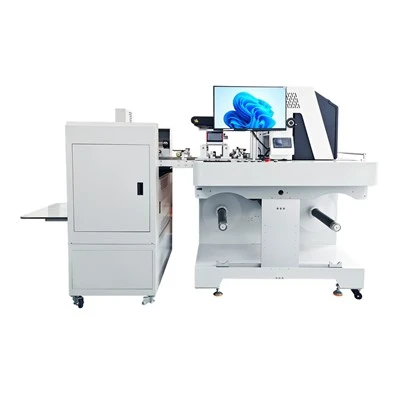
Now, I want to be clear about my side: I work directly with these mini desktop single pass printers, so I’m not unbiased, but I’m also not gonna lie to you. I’ve seen the good and the bad, and I know this works for the right people. So if you’re ready to upgrade your home printing, let’s talk.
Water-based Digital Inkjet Printer References:
- Consumer Reports, 2023 Home Printer Performance Testing: Mini Single Pass Units,
- Print Technologies Journal, 2022: Single Pass Print Efficiency for Residential Use,
- Small Business Trends, 2024: Home Side Hustle Printing Needs Survey,
- Independent Hardware Testing Group, 2023: Desktop Printer Noise and Space Requirements.
Chengdu Kelier Electronic Co., Ltd.
As one of the most professional mini desktop single pass printer manufacturers and suppliers in China, our products have good reputation in the market. Please feel free to buy advanced mini desktop single pass printer made in China here from our factory. We also accept customized orders.
Address: Unit 1302, 13th Floor, Building 1, Unit 2, No. 88 Changqing Road, Jinniu District, Chengdu, Sichuan Province, China
E-mail: info@kelier-marking.com
WebSite: https://www.kelier-printer.com/
